
Looking for help?
Getting Started
- How to register with MyPanel?
- Step-by-step guide to set up your printer.
- How to install the PrinterCo app?
- How to install Printerco app to TPS900 printer?
- How to add or register a printer to MyPanel
- How to connect a thermal printer with the PrinterCo app?
- How to Login & Connect my POS Printer?
- How to Activate a Test License Key for PrinterCo
- Locating your plugin license key For WooCommerce, Shopify, Wp-Pizaa, Etc
- Why my printer is not registered with printerco?
- How to get the API key, API password and Printer ID
- How to Place a test order?
- Automatically print orders
- Dispatch Orders & Send SMS Alerts To Customers
- How to Buy SMS Credit from MyPanel Dashboard?
- SMS Order Notifications Setting
- How do print the customer's Name, Address, and phone number on the receipt?
- How to print a logo on the receipt?
- Recommended Fonts setting for the nice looking layout
- My printer is not printing!
- Troubleshooting with WatchDog
- How to remove HTML from printed receipts?
- Change subscription plan
- Printer Functions
- List of woocommerce plugins that are compatible with PrinterCo printing plugin
- Can I print orders from WooCommerce?
- WooCommerce POS Order Printer (plugin installation guide)
- How do I print a WooCommerce order?
- How do I automatically print WooCommerce orders?
- How do I print a customer order in WooCommerce?
- Print Additional Fees on wooCommerce
- How to build an order status page for customers in woocommerce
- WooCommerce Email notifications are not sending
- What are the woocommerce email placeholders?
- Woocommerce troubleshooting (Step-by-step)
- Woocommerce order status not changing
- Print 'EAT IN' orders to a WooCommerce POS printer for a table ordering
- Print 'EAT IN' orders to a WooCommerce POS printer for a table ordering
- Shopify order printer. Integration with Shopify
- Integration with SquareSpace
- Connect your GloriaFood store to printerco order printer- NO CODING IS REQUIRED!
- Build an app with AppInstitute's app builder & PrinterCo's receipt printer
- WP-Pizza Order Printer (plugin installation guide)
- API Documentation
- How to Install & Configure the PrinterCo Windows App for Automatic Order Printing
- List of printers that work with PrinterCo app.
- List of Shopify app that are compatible with PrinterCo automatic order printing
- Automatically print orders using Epson printer. How to connect an Epson printer with the PrinterCo app?
- Show all articles (33) Collapse Articles
MyPanel Settings
- How to register with MyPanel?
- How to add or register a printer to MyPanel
- Step-by-step guide to set up your printer.
- How to connect a thermal printer with the PrinterCo app?
- How to print a logo on the receipt?
- Automatically print orders
- How to Buy SMS Credit from MyPanel Dashboard?
- My printer is not printing!
- Troubleshooting with WatchDog
- Change subscription plan
- Automatically print orders using Epson printer. How to connect an Epson printer with the PrinterCo app?
Website Integration
- Locating your plugin license key For WooCommerce, Shopify, Wp-Pizaa, Etc
- WooCommerce POS Order Printer (plugin installation guide)
- How to build an order status page for customers in woocommerce
- Print Additional Fees on wooCommerce
- WooCommerce Email notifications are not sending
- What are the woocommerce email placeholders?
- Print 'EAT IN' orders to a WooCommerce POS printer for a table ordering
- Print 'EAT IN' orders to a WooCommerce POS printer for a table ordering
- Shopify order printer. Integration with Shopify
- Connect your GloriaFood store to printerco order printer- NO CODING IS REQUIRED!
- Integration with SquareSpace
- Build an app with AppInstitute's app builder & PrinterCo's receipt printer
- WP-Pizza Order Printer (plugin installation guide)
- How to remove HTML from printed receipts?
- API Documentation
WooCommerce Integration
- WooCommerce POS Order Printer (plugin installation guide)
- Locating your plugin license key For WooCommerce, Shopify, Wp-Pizaa, Etc
- Can I print orders from WooCommerce?
- How do I print a customer order in WooCommerce?
- How do I print a WooCommerce order?
- How do I automatically print WooCommerce orders?
- Print Additional Fees on wooCommerce
- How to build an order status page for customers in woocommerce
- Print 'EAT IN' orders to a WooCommerce POS printer for a table ordering
- Print 'EAT IN' orders to a WooCommerce POS printer for a table ordering
- List of woocommerce plugins that are compatible with PrinterCo printing plugin
- How to remove HTML from printed receipts?
- What are the woocommerce email placeholders?
- WooCommerce Email notifications are not sending
- Woocommerce order status not changing
- Woocommerce troubleshooting (Step-by-step)
- Show all articles (1) Collapse Articles
Shopify Integration
Gloriafood Integration
Squarespace Integration
AppInstitute app Integration
Wp-pizza Integration
FAQs
- Why my printer is not registered with printerco?
- How to register with MyPanel?
- How to install the PrinterCo app?
- How to install Printerco app to TPS900 printer?
- How to Login & Connect my POS Printer?
- Can I print orders from WooCommerce?
- Step-by-step guide to set up your printer.
- How to Place a test order?
- How to print a logo on the receipt?
- How do print the customer's Name, Address, and phone number on the receipt?
- How to Buy SMS Credit from MyPanel Dashboard?
- My printer is not printing!
- How do I print a WooCommerce order?
- How do I print a customer order in WooCommerce?
- How do I automatically print WooCommerce orders?
- Change subscription plan
- List of printers that work with PrinterCo app.
- Show all articles (2) Collapse Articles
Printer Functions and Setup
- Step-by-step guide to set up your printer.
- How to add or register a printer to MyPanel
- How to Login & Connect my POS Printer?
- How to connect a thermal printer with the PrinterCo app?
- Automatically print orders
- How do print the customer's Name, Address, and phone number on the receipt?
- How to print a logo on the receipt?
- Recommended Fonts setting for the nice looking layout
- Dispatch Orders & Send SMS Alerts To Customers
- SMS Order Notifications Setting
- My printer is not printing!
- Troubleshooting with WatchDog
- How to Install & Configure the PrinterCo Windows App for Automatic Order Printing
- Automatically print orders using Epson printer. How to connect an Epson printer with the PrinterCo app?
API Documentation
Account and Billing
< All Topics
Print
How to print a logo on the receipt?
Posted
Updated
ByPrinterCo System
In this tutorial, you’ll learn how to customize your receipts to improve your brand awareness. We’ll take a boring-looking receipt and add a logo at the top, and give it some life!
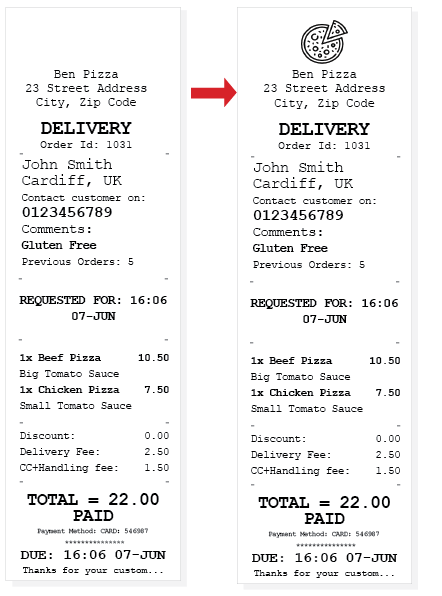
Let’s Get Started!
Step 1 – Prepare the logo
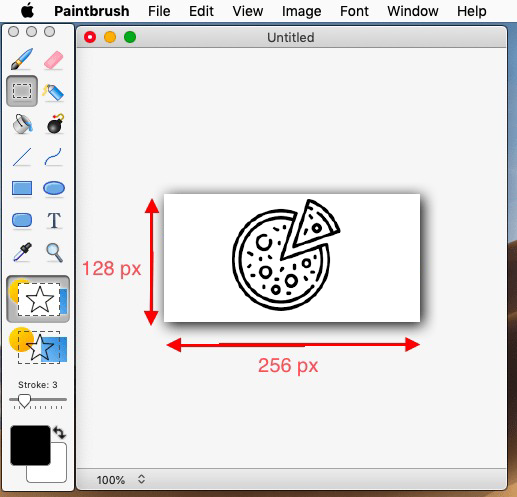
- You need to resize your logo to have a maximum width of 256 pixels, and a maximum height of 128 pixels. Dimensions higher than these will fail to print.
- Open any photo editor application, i.e. Paint for Windows or GIMP for OS X
- Create a new canvas 256px by 128 px.
- Paste your logo into the canvas.
- Save the image in PNG format.
STEP-1
Step 2 – Upload the PNG logo to MyPanel
- Login to your MyPanel dashboard.
- Navigate to your Printer List and click the edit button for the printer you wish to upload the logo for.
- Upload your .png logo and click the submit button to save your changes
STEP-2
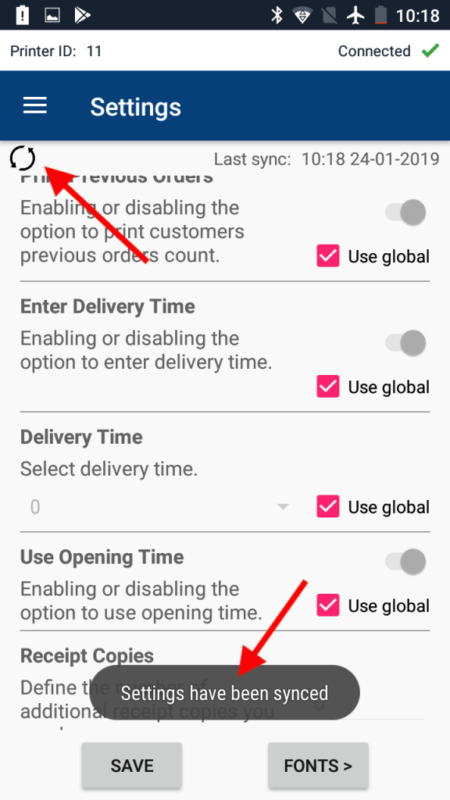
Step 3 – Sync the Printer app with MyPanel
- Now that your logo has been uploaded to your MyPanel dashboard, your thermal printer will NOT PRINT THE LOGO UNTIL YOU SYNC THE APP WITH YOUR DASHBOARD. Please follow the video below depend on the APP you are using
Sync Logo from Android APP
Open the Side menu from the app and navigate to Print Settings
Sync Logo from Windows app
Table of Contents